
%20copy.jpg)
Every extension has a logo. A tiny image sitting in your toolbar, a visual shorthand for trust. You glance at it, you recognize it, you move on. You probably never think about what's actually inside that file.
The authors of GhostPoster are counting on that.

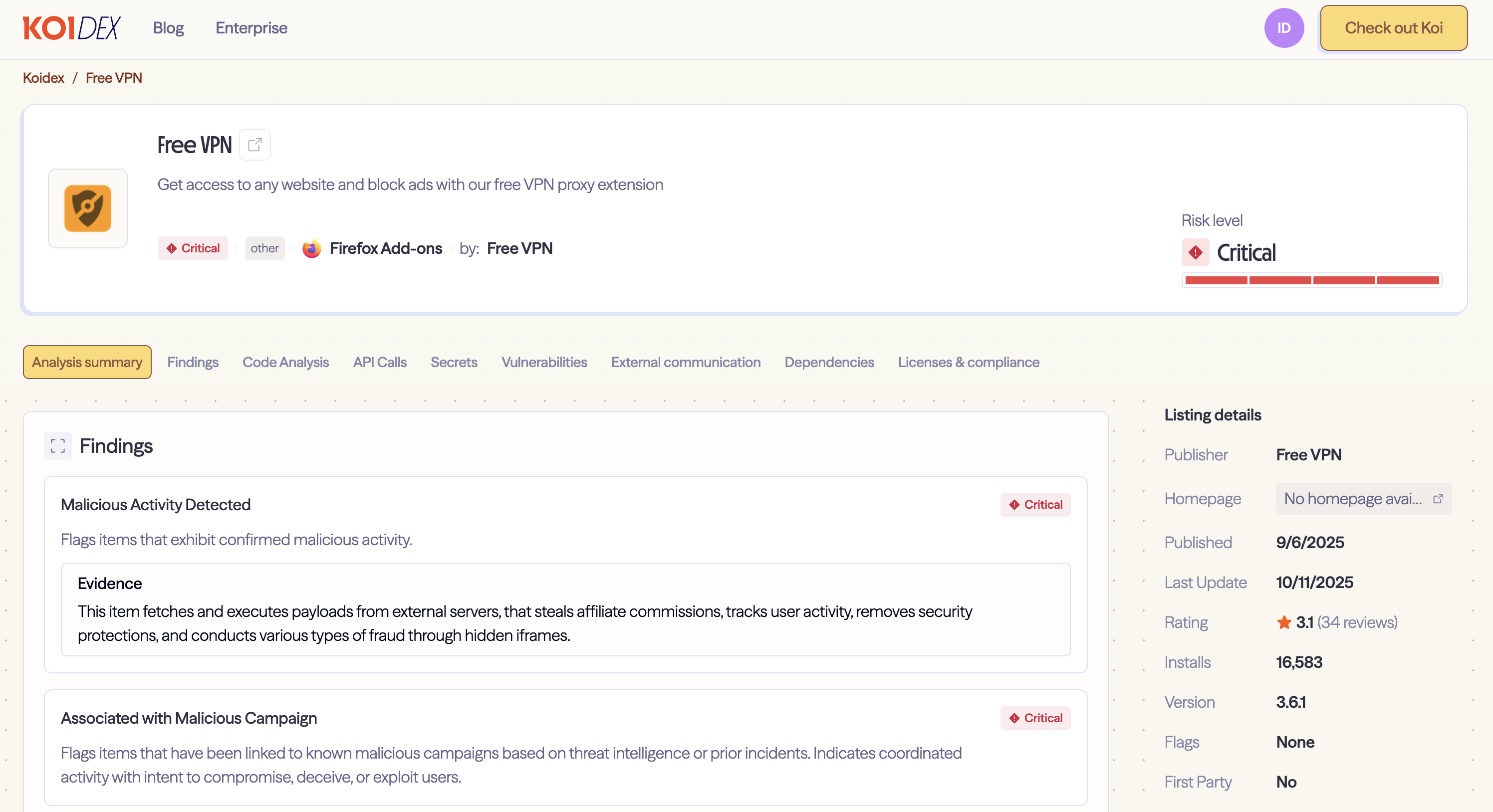
Our risk engine, Wings, flagged anomalous behavior in a Firefox extension called Free VPN Forever. The extension was reading its own logo file, standard behavior, but then doing something unusual with the raw bytes. When we dug into the code, we found a hidden extraction routine. The extension wasn't just displaying the logo. It was searching through the image data, looking for a marker that shouldn't be there.
Inside that friendly little planet icon, past where the image data ends, we found malware. Embedded in the bytes of the PNG file itself, waiting to be extracted and executed.
Free VPN Forever has been on the Firefox Add-ons marketplace since September 2025, with over 16,000 installations. It's still live as of this writing. And it's not alone, the campaign spans 17 Firefox extensions with over 50,000 combined installations. Extensions promising free VPNs, translation tools, weather forecasts, ad blocking, the usual lures. What they actually deliver is a multi-stage malware payload that monitors everything you browse, strips away your browser's security protections, and opens a backdoor for remote code execution.
Stage 1: The Logo
When Free VPN Forever loads, it fetches its own logo file logo.png. Standard behavior for any extension. But then something unusual happens.
The code starts searching through the raw bytes of the image, looking for a marker: three equals signs (===). Everything after that marker isn't image data. It's JavaScript, hidden in plain sight.
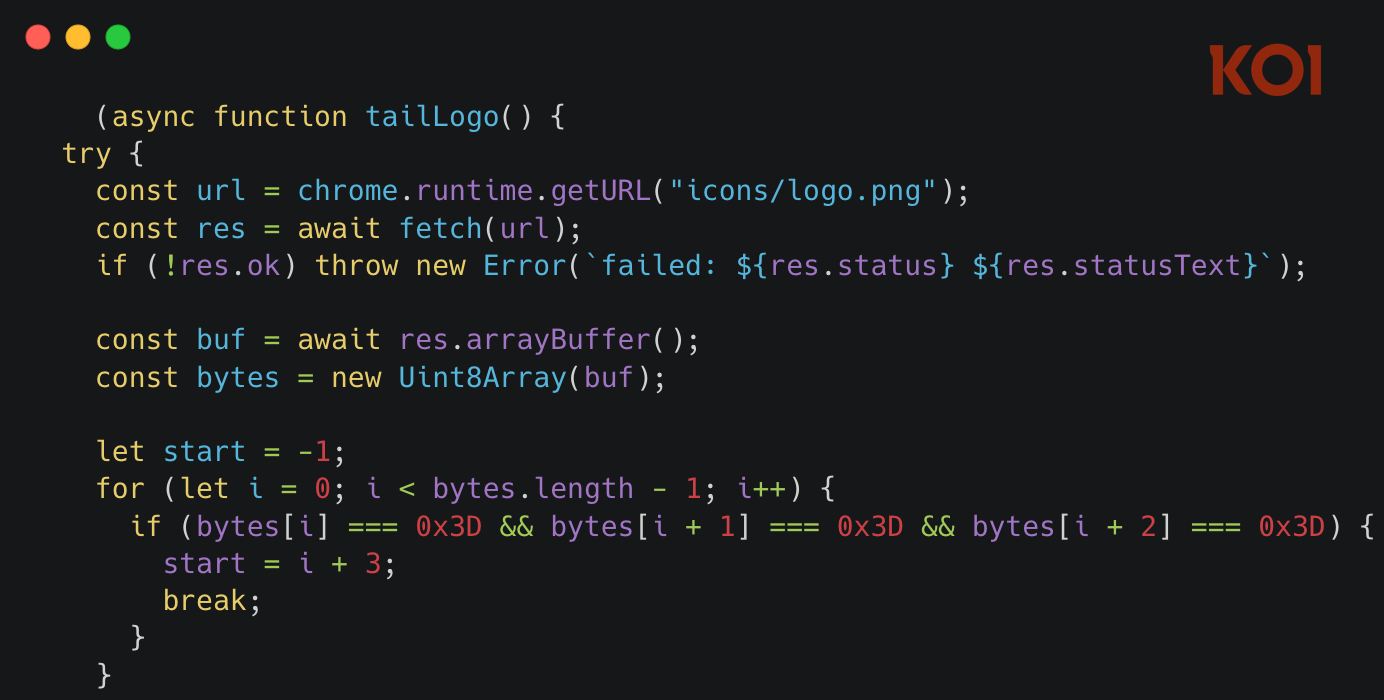
The technique is called steganography - hiding information inside something that looks completely innocent. Security scanners examining the extension's JavaScript files won't find the payload. Code reviewers won't see it. The logo displays normally in your toolbar. Nothing looks wrong.
But every time the extension loads, it extracts that hidden code and runs it.
Stage 2: The Loader
The code pulled from the logo isn't the actual malware. It's a loader, a small program whose only job is to fetch the real payload from a remote server.
The loader reaches out to www.liveupdt[.]com. If that fails, it tries the backup: www.dealctr[.]com. The request includes a signature parameter, so the attackers can track which infected extensions are checking in.
- Primary:
www.liveupdt[.]com/ext/rd.php?f= - Backup:
www.dealctr[.]com/ext/load.php?f=svr.png
But the loader doesn't phone home every time. It waits 48 hours between check-ins. And even then, it only actually fetches the payload 10% of the time. The other 90%? It just... doesn't. Random chance.
This is deliberate. Security researchers monitoring network traffic might watch an infected extension for hours and see nothing suspicious. The malware is patient. It knows that inconsistent behavior is harder to catch than consistent behavior.
Stage 3: The Cipher
When the payload does arrive from the C&C server, it's not readable JavaScript. It's been transformed using a custom encoding scheme.
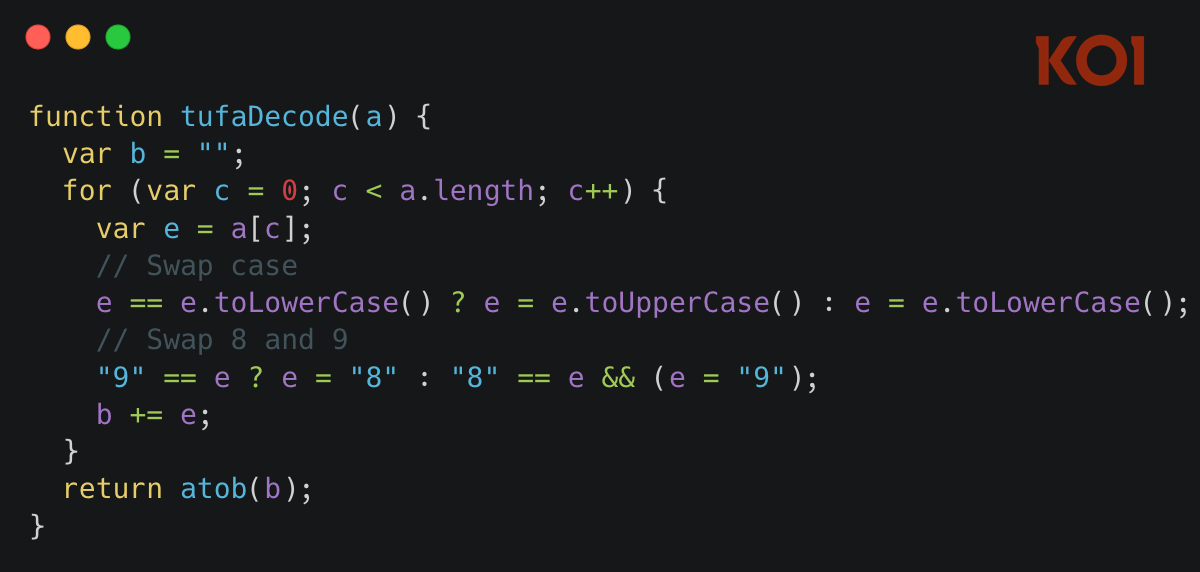
The decoding algorithm is almost playful in its simplicity:
- Swap all lowercase letters to uppercase, and vice versa
- Swap all 8s and 9s
- Base64 decode the result
The decoded payload gets XOR encrypted using a key derived from the extension's unique runtime ID, then stored in browser storage. Persistence achieved.
Stage 4: The Payload
This is where it gets interesting.
The final payload pulled from the C&C server, decoded, and executed, is a comprehensive toolkit for monetizing your browser without your knowledge.
Affiliate Link Hijacking
The malware watches for visits to major e-commerce platforms. When you click an affiliate link on Taobao or JD.com, the extension intercepts it. The original affiliate, whoever was supposed to earn a commission from your purchase, gets nothing. The malware operators get paid instead.
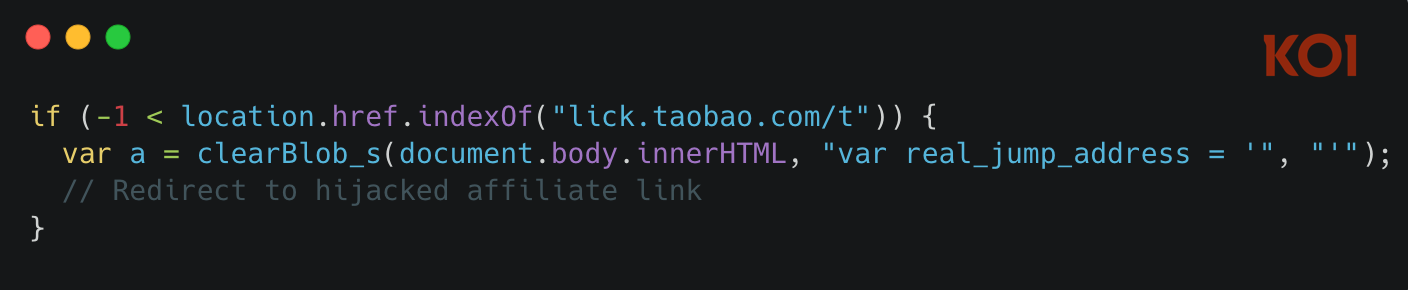
It's invisible to the user. You still end up on the product page. You still make your purchase. The only difference is who gets the commission.
Tracking Injection
The malware injects Google Analytics tracking into every page you visit. Tracking ID: UA-60144933-8. It collects your extension installation date, how many days you've been infected, which merchant networks you visit, and a unique identifier tied to your browser.
Hidden div elements get injected into pages with IDs like extwaigglbit and extwaiokist. These elements contain tracking attributes, installation days, signatures, merchant network data, that can be read by scripts on the page or by the extension itself.
You're being profiled, and you'd never know it.
Security Header Stripping
The malware actively removes security headers from HTTP responses:
Content-Security-Policy- goneX-Frame-Options- gone
These headers exist to protect you from clickjacking and cross-site scripting attacks. The extension strips them from every response, on every site you visit. Your browser's security model, quietly dismantled.
CAPTCHA Bypass
The malware includes multiple methods for bypassing CAPTCHA challenges. One method creates an invisible overlay and simulates user interaction. Another loads an external CAPTCHA solver from refeuficn.github.io. A third checks if you're logged into Baidu and uses your account status as verification.
Why would malware need to bypass CAPTCHAs? Because some of its operations, like the hidden iframe injections, trigger bot detection. The malware needs to prove it's "human" to keep operating.
Hidden Iframe Injection
The extension injects invisible iframes into pages, loading URLs from attacker-controlled servers. These iframes enable ad fraud, click fraud, and additional tracking. They're created, used, and deleted, leaving no visible trace.
The referrer policy gets manipulated to hide where the traffic is coming from. The iframes disappear after 15 seconds. Forensic analysis would need to catch them in the act.
The Evasion Playbook
What makes GhostPoster effective isn't any single technique, it's how they're layered together.
Steganography hides the initial payload where scanners won't look.
Staged loading means the actual malware never exists as a file, it's fetched at runtime.
Custom encoding defeats pattern matching.
Random delays and probability checks make behavior inconsistent and harder to observe.
Time delays prevent the malware from activating until 6+ days after installation, long after most security reviews would have concluded.
XOR encryption protects stored data from casual inspection.
Each layer isn't particularly sophisticated on its own. Combined, they create something genuinely hard to detect.
17 Extensions, Same Infrastructure
Free VPN Forever isn't alone. We found 16 other Firefox extensions communicating with the same C&C infrastructure - liveupdt.com and dealctr.com. Different extensions, different lures, same backend.
Some use the PNG steganography technique. Others download JavaScript directly and inject it into every page you visit. Others use hidden eval() calls with the C&C domains encoded using custom ciphers.
Same attacker. Same servers. Different delivery mechanisms. This looks like experimentation, testing which approach evades detection longest, which gets the most installs, which generates the most revenue.
Collectively, these extensions have been installed over 50,000 times.
The "Free VPN" Pattern
GhostPoster isn't the first time we've seen free VPN extensions turn malicious. It's becoming a pattern.
.png)
Earlier this week, we exposed Urban VPN Proxy - a Google-featured extension with 8 million users that was secretly harvesting AI conversations from ChatGPT, Claude, and Gemini and selling them to data brokers.
Before that, FreeVPN.One - another featured, verified extension with 100,000+ installs - was silently capturing screenshots of everything users browsed, including bank accounts, private photos, and sensitive documents.
Free VPNs promise privacy, but nothing in life comes free. Again and again, they deliver surveillance instead.
Final Thoughts
What makes GhostPoster dangerous isn't any single technique. It's the access.
These extensions strip your browser's security headers on every site you visit. They inject code into every page. They maintain a persistent connection to attacker-controlled servers, waiting for instructions. The payload can be updated at any time. What runs in your browser tomorrow is entirely up to them.
The steganography is clever. The layered evasion techniques show operational maturity. But the real threat is simpler: 50,000 users installed extensions that gave attackers full control of their browsers, and those extensions are still live on the Firefox Add-ons marketplace.
We built Koi to detect exactly these kinds of threats - malicious extensions that slip past marketplace reviews and compromise user environments. Our risk engine flagged the anomalous behavior of GhostPoster's image-loading code before we ever extracted the hidden payload.
Book a demo to see how behavioral monitoring catches threats that static analysis misses.
IOCs
Extensions
- free-vpn-forever
- screenshot-saved-easy
- weather-best-forecast
- crxmouse-gesture
- cache-fast-site-loader
- freemp3downloader
- google-translate-right-clicks
- google-traductor-esp
- world-wide-vpn
- dark-reader-for-ff
- translator-gbbd
- i-like-weather
- google-translate-pro-extension
- 谷歌-翻译
- libretv-watch-free-videos
- ad-stop
- right-click-google-translate
Network Indicators
- Primary C2: www.liveupdt[.]com
- Backup C2: www.dealctr[.]com
- Additional C2: mitarchive[.]info
- CAPTCHA solver: refeuficn.github.io
File Indicators
- Steganography marker in logo.png:
=== (0x3D 0x3D 0x3D) - Storage keys:
dipLstCd667,dipLstSig667,dipLstLd667
Tracking
- Google Analytics ID:
UA-60144933-8